
Autonomous coding agents can download third-party dependencies, run installations, and inspect around your system with almost no human supervision. Malicious actors are now utilising this convenience to accelerate their attacks and campaigns. If you do not take a layered defence approach to security, your coding agent might be downloading compromised malware to your system, secretly reporting credentials to a remote server, or installing backdoors for dead-man’s switch.
On the package registry side, we are seeing an explosion of malicious packages being published to public registries. For example, Sonatype, a security company, logged 464,650 malicious open source packages just in Q2 of 2026. Out of them, the NPM registry accounts for 96.6% of activities. Attackers are leveraging the power of AI to expand the speed and coverage of their campaigns. Here are just a few new examples where supply-chain attacks have evolved when compared to a few years ago:
- Typosquatting: Attackers watch common LLM model hallucination patterns, register those names on the public registry, and wait for agents to install them. The agent did not “choose a bad package”. It invented a package that the attacker then supplied.
- Multiple ecosystems: Attackers use LLMs to generate malicious libraries in multiple programming languages, and then use agentic pipelines to publish and maintain across several public package registries. Before AI, this would have taken a significant amount of man power, but can be entirely automated today.
- Greyware. Code you cannot cleanly label as malware yet, but cannot be trusted either. Examples: troll packages that dump ASCII art into logs or rename unnecessary files. Libraries that are either abandoned by maintainers or published by newly registered users. Low quality code that contains poorly optimised code or memory leaks. Greyware is on the rise because humans - both the authors and users - have stopped reviewing code.
- Sophisticated social engineering: Attackers don’t just target the source code; they are actively targeting the humans behind the ecosystems. By using different agents with personas, they can pretend to be legitimate actors who are trying to submit a pull request, or asking for help in emails. Maintainers are flooded with requests, and it is becoming more difficult to separate users who are genuinely trying to help and those who are not. One mistake, and they could accidentally grant permissions to an attacker, and compromise the ecosystem. The blame should never be on the maintainers, but on the lack of support and solutions from the ecosystem and platforms.
In this blog, we are using coding agents and the npm package registry as examples, but the same defensive principles can be applied to other types of agentic architectures and package registries too (for example, pypi, crates, rubygems, etc). The recommended tools below are mostly free and open-source. Once you understand this problem with a clear mental framework, then you’ll have the choice of either build your own or evaluate premium solutions.
“Model, Harness, and Sandbox”
The Model Layer
Starting with the model, they are the brain of AI, improving this core component of the stack will reduce the chances of hallucinations or executing dangerous commands. Or, for security-sensitive operations, it is worth considering using “Cyber-enhanced” models such as “GPT-5.6 Cyber”.
When compared to traditional models, cyber models have the additional abilities of autonomous vulnerability discovery, automated patching, and can even chain multiple vulnerabilities and bugs together to form an end-to-end report. Cyber models can also be split into “Red Team” or “Blue Team” variants, where the models act as either the attacker or the defender. A few well-known cyber models that are available today are:
- GPT-5.6 Cyber, Daybreak Blue, Daybreak Red
- Gemini 3.8 Cyber, Fairwind Program
- Claude Mythos 5 or 5.1
- GLM-5.3
The Harness Layer
A coding agent consists of the model and the harness. The harness controls how the model interacts with tools, files, and the network. Therefore, we need to build safer defaults and guardrails into the harness too. Here, we’ve split the harness into three distinct stages:
- Best practices
- Planning
- Installation
Harness: Best Practices
For an agent, best practices mean baseline environment defaults that you should enable for the agent’s runtime. In the NPM ecosystem, they can be applied to the package manager, runtime, or publishing configurations, and more. For example, to enable the following npm package manager best practices:
- Ignore lifecycle scripts
- Dependency cooldowns
- Generating provenance statements
You can define them in a global or project-based .npmrc:
ignore-scripts=true
min-release-age=3 # days
provenance=true
You should enable or tweak more configs to protect against low-hanging attack vectors. For a more extensive guide or other package managers other than npm, this public repo goes into more detail.
Harness: Planning
Sensible environmental defaults like the best practices help prevent common malware patterns, e.g., the postinstall lifecycle, but they do not stop the agents from selecting greyware. As we mentioned in the introduction, greyware is software that is not exactly malware yet, but we should still be cautious about installing it.
This is where the “Planning” stage comes in. Within this stage, the agent should evaluate dependencies, and query relevant health metrics, for example: download history, maintainer activities, quality, licenses, etc. There are “scorer” tools that aggregate these metrics for us, combined into a single number, for example: 0 to 100. From there, we can set a policy of a baseline - say, nothing below 80 - and if a package doesn’t meet this criteria, we don’t consider it.
Here are few free and well-known dependency scorers on the market:
Here we’ll use “Socket MCP Server” as an example. When queried, the Socket MCP server returns a depscore tool that returns supply chain, maintenance, vulnerability, and license scores for packages across ecosystems. With Claude Code, it can be added like so:
claude mcp add --transport http socket-mcp <https://mcp.socket.dev/>
Or for Cursor / most MCP clients:
{
  "mcpServers": {
    "socket-mcp": {
      "type": "http",
      "url": "<https://mcp.socket.dev/>"
    }
  }
}
Here's an example of an NPM package being scored:
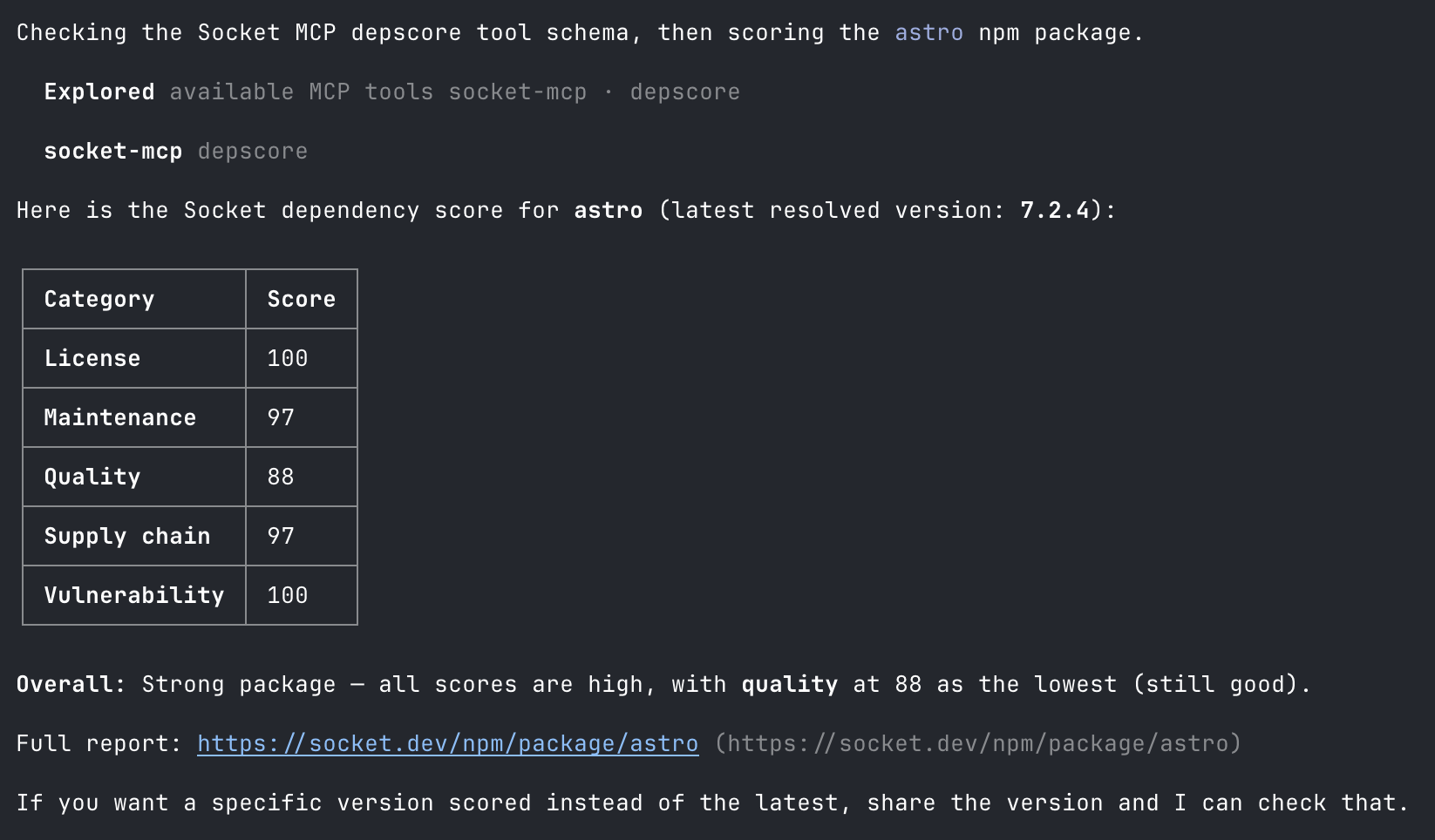
See https://socket.dev/alerts for breakdown on how Socket scores each category
From here, customise your dependencies policy, either hard-code or inside the AGENTS.md:
Before adding or updating any dependencies, call the Socket MCP server on the
exact package name and version. If supply chain, quality, or vulnerability
scores are below 80, do not install it. Propose alternatives.
Harness: Installation
The “Planning” stage can be useful in avoiding greyware, but in the case of a popular and well-known package (such as react or express) are compromised, we need one more safety check just before the installation. We should scan with a real-time intelligence database for known vulnerabilities. Here are few free and trustworthy “scanners” on the market:
an We will use the Socket Firewall Free CLI sfw as example here. It needs no API key, intercepts the network fetch, checks against Socket’s real-time threat intelligence, and blocks confirmed malware before the tarball lands. The sfw cli also supports package registries from other programming languages such as pip / uv and cargo , etc.
There are many ways we can enable sfw within an agent, here are a few:
- Wrapper script in
$PATH - Prompt through SKILL or within
AGENTS.md - Enable as agent lifecycle hook
Wrapper script in $PATH
Create a smaller wrapper executable script in a directory that comes before the real package manager in your system $PATH (e.g., ~/.local/bin or ~/bin):
1. First, install sfw globally
npm i -g sfw
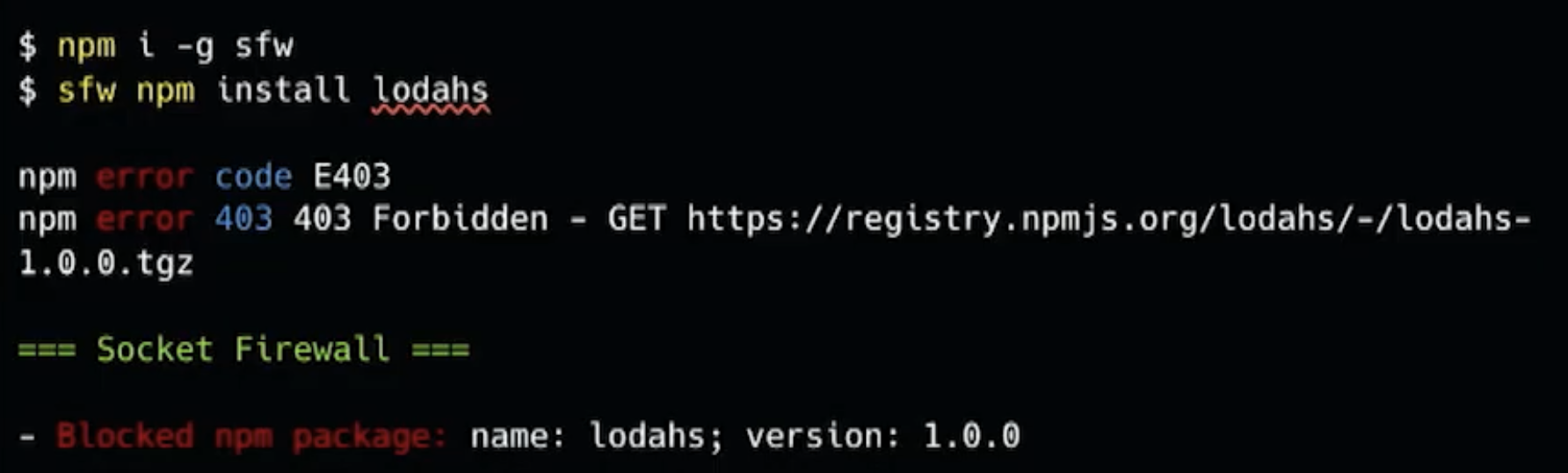
2. Check sfw is working correctly
3. Ensure the directory is at the front of your $PATH
# Add to ~/.bashrc, ~/.zshrc, or equivalent
export PATH="$HOME/.local/bin:$PATH"
4. Create a wrapper script
For npm: ~/.local/bin/npm (remember to check your package managers)
#!/usr/bin/env bash
exec sfw npm "$@"
5. Make it executable
chmod +x ~/.local/bin/npm
6. Within an agent, we can verify by ask the agent to execute the following commands:
which npm- should return our wrapper location, e.g.,~/.local/bin/npminstead of the standard node/npm installation path (e.g.,/usr/local/bin/node/npm)npm install lodahs- should return Socket error, as it is a blocked npm package, as reasoned here: https://socket.dev/npm/package/lodahs/alerts/0.0.1-security
Prompt through SKILL or within AGENTS.md
Below is an excerpt from https://github.com/bodadotsh/npm-security-best-practices/blob/main/skills/npm-security/SKILL.md but a similar shorter prompt can be placed inside AGENTS.md:
---
name: npm-security
description: Prevent JavaScript/TypeScript projects from supply-chain attacks across package managers like npm, pnpm, yarn, bun, and deno. Use whenever planning, installing, updating packages or configuring package managers
---

## Install stage / package scanner

When time to install third-party dependencies, we should validate them against a package scanner first. This reduces risk of compromises as the scanner will check against a real-time intelligence database.

A free scanner solution is the Socket Firewall Free cli `sfw`. Can use other package scanners if user configured explicitly.

The `sfw` cli can be downloaded first through `npm i -g sfw` or through `npx`: `npx sfw npm install <package>`

If any package got compromised, as soon as the Socket security updated their database, the `sfw` cli can reject the package installations in real-time even before the malicious tarball reaches the user.

## References

- https://docs.socket.dev/docs/socket-firewall-free
Enable as agent lifecycle hook
Here’s how sfw could be cooperated as a PreToolUse hook:
# ~/.claude/settings.json
{
  "hooks": {
    "PreToolUse": [
      {
        "matcher": "Bash",
        "hooks": [
          {
            "type": "command",
            "command": "$HOME/.claude/hooks/sfw-wrap-pm.py"
          }
        ]
      }
    ]
  }
}
The sfw-wrap-pm.py script can start with the following:
Save this as ~/.claude/hooks/sfw-wrap-pm.py then:
chmod +x ~/.claude/hooks/sfw-wrap-pm.py
The script reads the proposed command on stdin. If it looks like a package manager, it returns updatedInput with sfw prepended. This wrap is Claude Code specific. Cursor has beforeShellExecution. Codex and OpenCode need their own equivalent.
The hook template has a few caveats:
/usr/local/bin/npmandnpxdo not match this regex. Inspect the logs to see if your agent uses them.curlto the registry never goes throughsfw.- If two PreToolUse hooks both return
updatedInput, last writer wins. Don't run two Bash rewriters.
It is recommended to customise this hook to fit into your exact workflows.
Are we relying on external intelligence services like Socket too much?
Security has always been difficult. Individuals need to track a constantly changing landscape. AI-assisted attackers have accelerated that pace, making it unrealistic for an individual developer, or even teams, to keep their own threat intelligence up to date.
That is why we need to rely on specialist security companies. This is not unique to supply chain packages: your operating system detects and blocks malware for you, your browser warns you about dangerous sites, and services such as Cloudflare defend websites from bots, abuse, and network attacks. Delegating part of the problem to experts is a normal layer in a defence-in-depth strategy. The trick is to always have a backup plan, and the next layer we introduce is for “what if an intelligence platform fails to defend for us?”.
The Sandbox Layer
Even after layers of preventions, when it comes to security, we should always assume the worst case and ask: “What if both the model and harness fail?“. The next defence layer would be the “sandbox”, and the goal is to “minimise the blast radius”.
Sandbox is not a simple topic, and it deserves its own series of blogs. There’s a famous “lethal trifecta” blog https://simonwillison.net/2025/Jun/16/the-lethal-trifecta/ detailing three key risks:
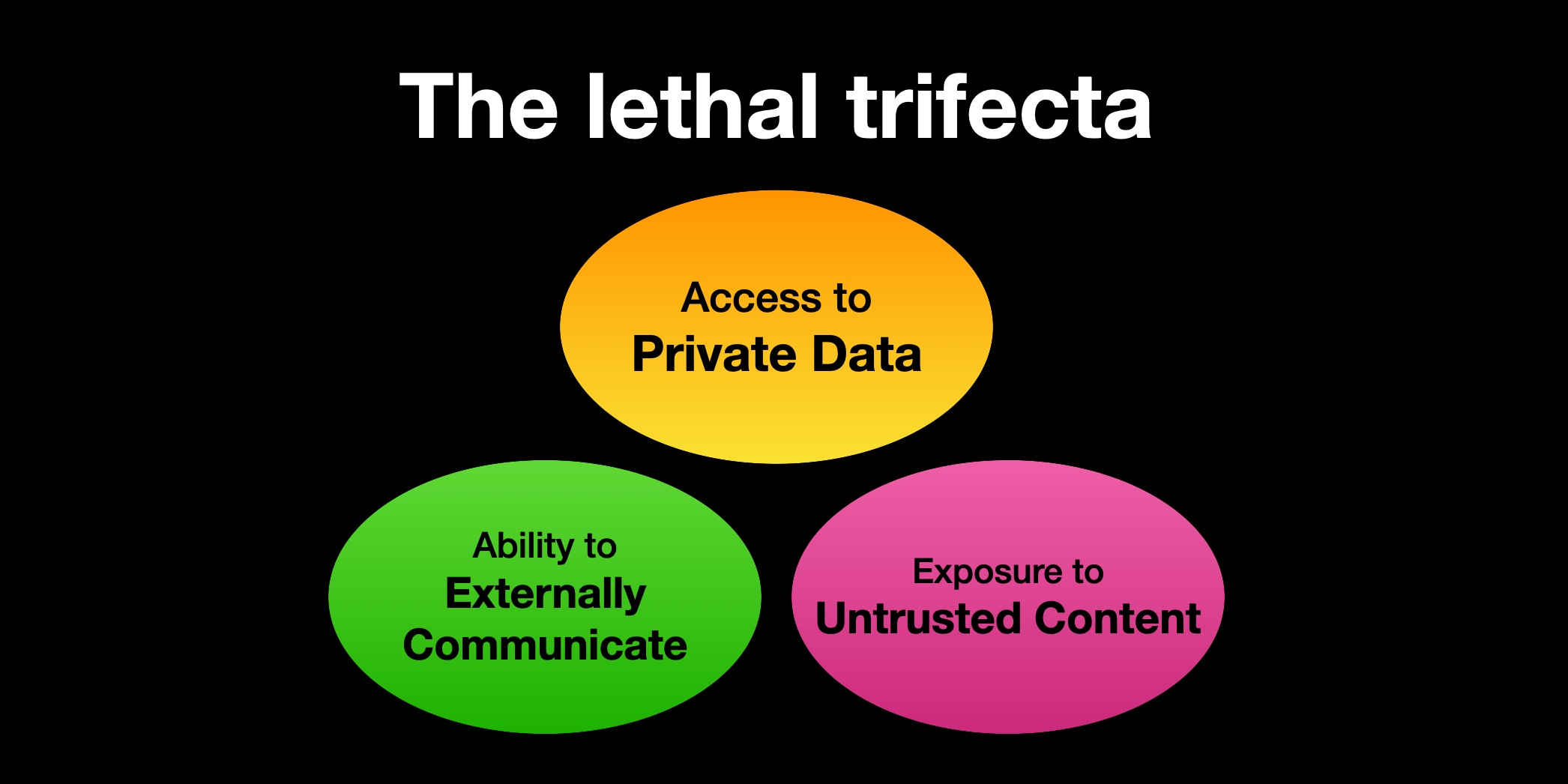
They could be translated into the following requirements for a coding agent sandbox:
- Ingress sanitisation. The sandbox needs secrets or sensitive data to do its job, but I need to sanitise data going in, so the malware doesn’t see the real values inside the sandbox.
- Isolation. I define whichever workspace is visible to the agent; other places like
~/.sshor unrelated projects should be isolated from it. - Egress control. I can control which outbound network is allowed.
There’s an invisible 4th requirement: “don’t add too much friction to the developer experience”. In many cases, if the security boundaries are constantly interrupting the flows, many developers won’t use it.
Doesn’t Claude Code/Codex/Cursor etc already provide sandbox features?
Unfortunately, the sandboxes built into these coding agents are only partial or opt-in. By default, they fail to meet the “lethal trifecta” requirements. The reason is simple: these tools prioritise friction-less productivities - meaning execute privileged shell commands, gather any local files for debugging purposes, and make network calls for contextualisation. Therefore, securing the agent environment where it prevents the lethal trifecta is left as an exercise for the developer.
Luckily, the Docker Sandbox (sbx) is a free product on the market that can prevent the lethal trifecta for us. It runs the agent inside a microVM, keeps real credentials on the host, and proxies outbound auth.
# store the real key on the host
sbx secret set openai

# start from a restrictive network posture, then allow what you need
sbx policy allow network registry.npmjs.org
sbx policy allow network api.openai.com
Docker Sandbox also allows the user to spin up their preferred agent:
# create a sandbox called "codex-sbx" with `codex` built-in
sbx run --name codex-sbx codex
sbx stop codex-sbx
sbx rm codex-sbx

# or create custom agent sandbox with `kit`, for example `pi`
sbx run --kit "git+https://github.com/docker/sbx-kits-contrib.git#dir=pi" pi
See Docker docs for a more detailed guide on how to get started with Docker Sandbox.
What’s next?
The three layers we’ve covered in this blog are only the starting points in securing against supply-chain attacks; there are still many defensive topics we haven’t covered. Moving to a secure-by-default foundation means “think coverage, not perfection”. Here are a few more security tips developers can look into:
- Use AI-assisted code review, and review their suggestions carefully. They are useful when teams face an overwhelming amount of pull requests and reach the review and understanding bottleneck.
- Pair that review with established application-security controls, such as SCA, SBOM, SAST, DAST to test the running application from an attacker’s perspective.
- Local protections do not help if GitHub Actions or other CI system can install anything and expose long-lived secrets. Pin actions and dependencies, minimise workflow permissions, isolate untrusted pull requests, prefer short-lived identity tokens, protect release jobs, and require review for workflow-file changes. Treat generated build artefacts as untrusted until they have passed policy and security cecks.
- Enterprise registry proxies such as Cloudsmith, Sonatype, or JFrog can add another enforcement point. They can cache approved packages, quarantine suspicious versions, enforce licence and vulnerability policies, and prevent builds from reaching public registries directly.
- Limit runtime permissions and use smaller production images whenever possible.
- For production, use a distroless or similarly minimal container image with no shell, package manager, compiler, or other tools the application does not need. Build in a separate stage, copy only the runtime artefacts into the final image, run as a non-root user, and use a read-only filesystem where possible. This does not prevent a vulnerable application from being exploited, but it removes many tools and paths an attacker would otherwise use after gaining execution.
- Node and Deno permission systems can restrict filesystem, network, environment-variable, and subprocess access. They are not safe proof but can add another layer of friction to malicious attempts.
None of these preventions are sufficient on its own. Established projects such as the MITRE ATLAS or OWASP Gen AI Security are regularly updated and offer more comprehensive resources on adversarial techniques beyond this blog.
Coding agents move fast, but they can also introduce dependencies you didn't choose and can't easily audit. YLD's engineers help you build in the checks that catch this before it ships. Contact us to talk through your setup.


.png)